
Clicks Power Keyboard Review: BlackBerry Typing Is Back for $99, But There's a Catch
TL;DR
- Clicks' new $99 Power Keyboard is a universal MagSafe/Qi2 slide-out accessory that brings a physical BlackBerry-style QWERTY keyboard to iPhones and other compatible smartphones without a dedicated case.
- It offers a surprisingly great tactile typing experience with backlit keys, customizable shortcuts, and passthrough wireless charging, plus a built-in battery that extends phone life.
- The catch is significant bulk and weight, with awkward top-heavy ergonomics especially on larger Pro Max and Android flagships that makes one-handed use difficult.
A BlackBerry Revival You Can Stick On Any Phone
If you miss the days of hammering out emails on a physical keyboard, Clicks has been listening. The company that made waves last year with its iPhone-specific Creator Keyboard case is back with something far more universal. The new Clicks Power Keyboard ditches the case entirely for a clever, detachable design that works with almost any modern phone.
Instead of needing a different model for every iPhone size and color, the Power Keyboard uses a strong MagSafe and Qi2-compatible magnetic attachment. That means it will snap onto any iPhone 12 or newer, plus a growing list of Qi2 Android devices like the latest Samsung Galaxy and Pixel phones. For phones without native magnets, a simple metal ring adapter is included. At $99, it's also $40 cheaper than the original Clicks Keyboard, making the BlackBerry dream much more accessible.
How It Works: Slide, Type, Hide
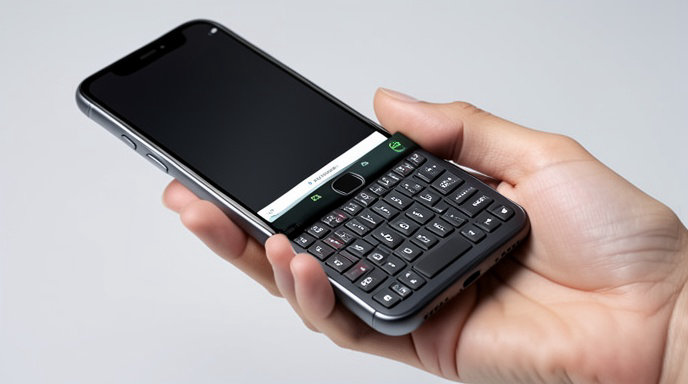
The magic is in the sliding mechanism. The keyboard itself is a thin, rigid deck that magnetically attaches to the back of your phone. When you need to type, you slide it down from behind the phone to reveal a full 36-key QWERTY keyboard complete with backlighting. When you're done, it slides back up and sits flush against the back of the device, leaving your screen fully unobstructed.
This is a huge improvement over the first-gen case, which permanently extended the length of the phone. Now you get to choose when you want the keyboard and when you want a normal slab phone. Clicks also says the attachment is strong enough for daily use and won't interfere with MagSafe wallets or car mounts when the keyboard is detached, though you will need to remove it to use those accessories.
The Typing Experience Is Still The Star
For anyone who learned to type on a Bold or Classic, the Power Keyboard will feel instantly familiar. The keys are clicky, tactile, and nicely domed with just the right amount of travel. It's not trying to replicate a laptop keyboard; it's a true thumb-typing experience designed for speed and accuracy without looking at your screen.
Reviewers who have gone hands-on say typing accuracy skyrockets after a day or two of adjustment, and typos plummet compared to a glass touchscreen. You also get real keyboard shortcuts. The Clicks app for iOS and Android lets you fully customize every key, so you can set a long-press on 'B' to open your browser, 'M' to jump to messages, or launch ChatGPT or Instagram instantly. The backlit keys are also a welcome addition for late-night texting that was missing on some early prototypes.
More Than Just a Keyboard: It's a Power Bank Too
The "Power" in the name isn't just for show. Unlike the original passive keyboard, the new Power Keyboard has its own built-in battery. Clicks says it provides up to several extra hours of power and supports passthrough Qi2 wireless charging, so you can charge your phone and the keyboard at the same time on the same charging stand without removing it.
It connects via Bluetooth Low Energy instead of a Lightning or USB-C passthrough, which is what allows for universal compatibility. Pairing is instant, and Clicks claims there is no noticeable latency while typing. The keyboard also has a USB-C port for fast charging the keyboard's own battery.
The Catch: Bulk, Weight, and Wobbly Ergonomics
For all its cleverness, the Power Keyboard can't defy physics. Adding a physical keyboard, a battery, magnets, and a sliding rail to the back of your phone adds noticeable bulk and weight. On a standard iPhone 16 or Pixel 9, it's manageable, but on larger devices like the iPhone 16 Pro Max or Galaxy S25 Ultra, the trade-offs become obvious.
When extended, the phone becomes extremely tall and top-heavy. Thumb-typing requires you to constantly shift your grip to balance the weight, and reaching the top of the screen for navigation becomes a stretch. It's undeniably awkward for one-handed use, and it makes the phone too thick to fit in many car mounts or tight pockets. It's also not ideal for apps that rely heavily on swipe gestures, as the keyboard deck sits right where your palms would normally rest.
Should You Buy It?
The Clicks Power Keyboard is the most practical and affordable way yet to get that beloved BlackBerry typing feel back. By going universal with MagSafe and Qi2, Clicks has solved the biggest problem with its first product: compatibility. If you send hundreds of emails, live in Slack, or just hate typing long messages on glass, the $99 price and genuinely excellent tactile experience make it a compelling, fun accessory.
Just know what you're signing up for. This is not a slim, invisible add-on. It's a deliberate, productivity-focused tool that transforms your sleek smartphone into a thicker, heavier, two-handed communication machine. For the right user, that's a perfect trade-off. For everyone else, it's a nostalgic novelty that might spend more time in your bag than on your phone.

Get All The Latest Updates Delivered Straight To Your Inbox For Free!