
Wacom MovinkPad 11 Review - A Fun and Affordable Graphics Tablet for Digital Artists
TL;DR
- The Wacom MovinkPad 11 is Wacom's first standalone Android drawing tablet, offering an 11.45-inch etched display and the flagship Wacom Pro Pen 3 for around $449 without needing a PC.
- It delivers a surprisingly natural, low-latency drawing experience with 8,192 pressure levels and Android creative apps, though its Helio G99 chip and LCD screen can't match pro-level power or OLED color.
- Ideal for beginners, students, and hobbyists, it strikes an excellent balance of fun, portability, and affordability, but serious professionals will still want a more powerful pen display.
Design, Build and What's In The Box
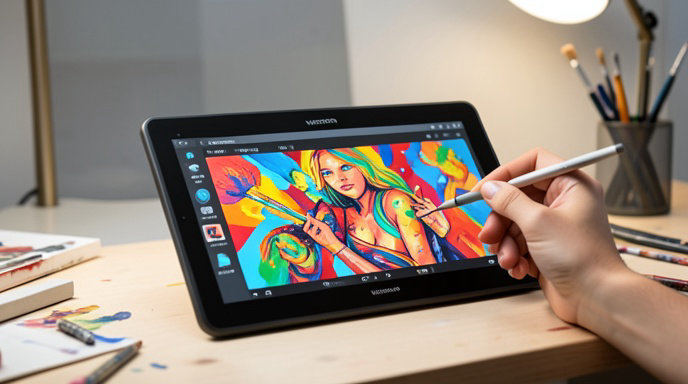
The MovinkPad 11 marks a major shift for Wacom. Unlike the company's traditional pen displays and pen tablets that require a computer, this is a fully standalone device running Android 14. At just 11.45 inches and around 600 grams, it's designed to be grabbed and sketched on anywhere, much like an iPad but with Wacom's artist-first DNA.
Build quality is classic Wacom - minimal, matte, and functional. The chassis is a sturdy plastic with a soft-touch finish that resists fingerprints, and the included folding folio case doubles as a stand with two drawing angles. In the box you get the tablet itself, the Wacom Pro Pen 3, three replacement nibs, and a USB-C cable. There's no charger included, which is worth noting.
The star of the show is the pen. Instead of a budget stylus, Wacom includes its top-tier Pro Pen 3, the same customizable pen used with its professional Cintiq and Movink lines. It supports 8,192 levels of pressure, 60-degree tilt recognition, and features interchangeable grips and side switches. For a mid-priced tablet, this is a huge value add and immediately sets it apart from cheaper Android alternatives.
Display and Pen Experience
The 11.45-inch LCD display has a 1920 x 1200 resolution, a 90Hz refresh rate, and up to 400 nits of brightness. It's not OLED, so blacks aren't inky and color coverage is rated at around 95% sRGB - good, but not the wide-gamut P3 coverage pros might expect. What makes it special is the etched AG glass. It has a subtle, paper-like texture that adds just enough tooth and friction to make drawing feel natural, while also cutting down on glare.
In practice, the creative performance is where the MovinkPad 11 shines for its price. Palm rejection is excellent, parallax is minimal, and latency is impressively low for an Android device. Whether you're doing light sketching or longer inking sessions, strokes feel immediate and accurate. Wacom has tuned the digitizer to feel familiar to anyone who has used an Intuos or One tablet.
On the software side, it comes pre-installed with Clip Studio Paint (with a two-year debut license), Wacom Canvas, and access to the Google Play Store for apps like ibis Paint, Krita, MediBang Paint, and Infinite Painter. The Android experience is clean and bloat-free, focused entirely on creation rather than entertainment.
Performance, Battery and Standalone Freedom
This is not a powerhouse tablet, and Wacom is upfront about that. The MovinkPad 11 is powered by the MediaTek Helio G99 chipset with 8GB of RAM and 128GB of storage (expandable via microSD). For drawing, layer management, and light photo editing, it's perfectly smooth. You can comfortably work with dozens of layers at 300 DPI in Clip Studio Paint.
Push it harder with huge canvases, 4K animation timelines, or heavy multitasking and you'll notice slowdowns and longer export times compared to an iPad Air or Samsung Galaxy Tab S9. This chip was chosen for efficiency and cost, not raw performance, and that trade-off keeps the price accessible.
Battery life is a strong point. The 7,700mAh battery easily delivers 10-12 hours of casual sketching or 6-7 hours of continuous intensive drawing at full brightness. Standby time is excellent as well, so you can leave it in your bag for days and pick it up ready to draw. Connectivity includes Wi-Fi 6, Bluetooth 5.2, and USB-C with DisplayPort support, so you can even use it as a traditional pen display for a PC or Mac if you want.
Who Is It For? Value and Verdict
The Wacom MovinkPad 11 launched in late 2025 for $449.95 / €499.90 / £429.99, and as of mid-2026 it has settled as one of the best value entry points into digital art. It directly competes with the base iPad + Apple Pencil and Samsung Galaxy Tab S series, but undercuts them on pen quality and paper-feel while offering a more focused creative workflow.
It's not trying to be a laptop replacement or a professional studio workhorse. There is no keyboard accessory, no desktop-grade processor, and the LCD won't satisfy color-critical print professionals.
Instead, it nails its core mission: lowering the barrier to digital art. For students, beginners, hobbyists, and even pros who want a portable, no-fuss sketchbook for ideas, comics, and illustrations on the couch, on the train, or at a coffee shop, it's a fun and genuinely affordable solution. It finally gives artists a true Wacom experience without needing to own a computer at all.
If your digital dreams involve serious 3D, heavy animation, or large-format professional illustration, you'll still want to invest in a Wacom One, Cintiq, or a more powerful tablet. But if you want a delightful, dedicated, and surprisingly capable drawing tablet that just works right out of the box, the MovinkPad 11 is an easy recommendation and arguably Wacom's most accessible product in years.

Get All The Latest Updates Delivered Straight To Your Inbox For Free!