
9 iPhone Duo Settings That Make Apple’s Foldable Easier to Use
TL;DR
- Apple has not publicly confirmed an “iPhone Duo” or its final software and hardware features.
- The most useful rumored settings would focus on biometric shortcuts, customizable volume buttons, multitasking, and camera controls.
- These tweaks could make a foldable iPhone quicker to operate, but their availability and names may change before launch.
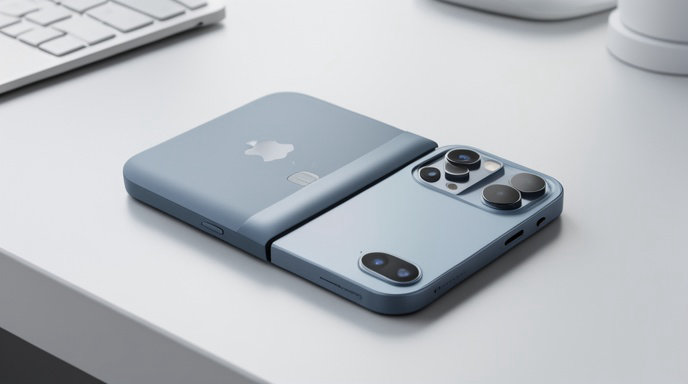
Apple’s rumored foldable iPhone—often described by reports and speculation as an “iPhone Duo”—could introduce a larger display without abandoning the familiar iPhone experience. While Apple has yet to officially announce the device, imagined software details point to an important part of the foldable’s appeal: how quickly users can adapt it to everyday tasks.
A foldable phone does more than add screen space. It changes how people open apps, handle notifications, take photos, adjust controls, and move between compact and expanded layouts. These nine settings could help Apple make that transition feel natural.
Because the iPhone Duo remains unannounced, the features below should be understood as expected or proposed capabilities rather than confirmed specifications.
Touch ID Shortcuts for Faster Access
A foldable iPhone could benefit from a Touch ID sensor built into the side button, particularly if Apple wants to preserve a clean display without a visible notch or Dynamic Island on every panel. A dedicated Touch ID settings menu could allow users to assign different actions to taps, presses, or gestures.
For example, a double press might open Apple Pay, while a long press could launch the camera or unlock a secure app. Users could also potentially configure Touch ID to authenticate purchases without first waking the entire display.
This would be especially useful when the phone is folded. Instead of opening the device to check a notification or access a shortcut, users could authenticate and complete a simple action from the outside screen.
Smarter Volume-Button Controls
On a larger foldable device, physical buttons may be harder to reach depending on how the phone is held. Apple could make the volume buttons more flexible by adding context-sensitive controls.
A settings panel could let users choose what the buttons do in different situations. In the camera app, they might control zoom, shutter release, or exposure. During media playback, they could skip tracks or adjust volume. In reading apps, they might turn pages.
Apple could also offer separate behavior for the folded and unfolded positions. That would allow the same buttons to remain useful regardless of whether the device is being used as a compact phone or a small tablet.
Customizable Folded and Unfolded Modes
A foldable iPhone would likely need distinct interface modes. The cover display could prioritize quick interactions, while the internal screen could emphasize multitasking and detailed content.
A “Folded Mode” settings section could let users select which apps appear on the outer display and which ones require the device to be opened. Users might choose to allow messages, music, maps, and the camera to work externally while reserving more demanding apps for the larger screen.
Apple could also let users decide whether an app should continue automatically when the device opens. A video might expand to the larger display, while a banking app could remain locked for privacy.
Camera Controls Designed for Both Screens
The camera could become one of the strongest reasons to own a foldable iPhone, but only if its controls are designed around both displays. A dedicated camera setting could determine which screen shows the viewfinder and which one displays controls.
When the phone is partially folded, the outer screen could act as a preview while the lower section shows shutter, zoom, and exposure controls. In a fully opened configuration, the larger display could provide a more spacious editing and framing interface.
Apple might also include an option to use the cover display as a preview for subjects. That would allow people to frame themselves using the main cameras rather than relying only on a front-facing sensor.
Customizable Action Button Behavior
A foldable iPhone could make better use of the Action button by offering different shortcuts based on the device’s position. A single press might activate Silent mode, while a double press could open the camera when folded and launch multitasking when unfolded.
The button could also trigger accessibility tools, translation, voice recording, or a custom Shortcut. Position-aware behavior would give the feature more value without requiring Apple to add another physical control.
An option to show a small confirmation on the cover screen would help users know that the command was recognized, especially when the phone is closed.
App Pairing for Multitasking
The internal display of a foldable iPhone would be well suited to running two apps side by side. Apple could simplify this with saved app pairs.
A user might create a “Travel” pair containing Maps and Messages, a “Work” pair combining Mail and Notes, or a “Shopping” pair linking Safari and Reminders. Tapping the saved pair would open both apps in a prearranged layout.
A related setting could let users choose how the pair is divided. Some combinations would work best with an even split, while others might need a wider browser window and a narrower notes panel.
Reachability for the Larger Display
A tablet-sized internal screen can be awkward to operate with one hand. Apple’s existing Reachability feature could be expanded for a foldable, moving interactive controls closer to the user’s thumb.
The setting could offer separate layouts for left- and right-handed use, along with an automatic option that responds to the phone’s orientation. Users might also be able to select whether Reachability shifts the entire interface or only the top portion of an app.
This would make routine tasks—such as closing a tab, adjusting a setting, or tapping a navigation control—less dependent on using two hands.
Cover-Screen Notification Controls
Notifications are more complicated on a foldable because they can appear on either the external or internal display. Apple could offer detailed controls for deciding what is shown when the phone is closed.
Users might choose to display only essential alerts on the cover screen, hide message previews, or require Touch ID before revealing sensitive content. Less urgent notifications could wait until the device is opened.
A “continue on open” option could also take users directly to the relevant app after they unfold the phone, reducing the number of taps needed to respond.
Adaptive Display and Battery Settings
Foldable displays could create new power demands, particularly when high refresh rates, bright screens, and always-on features are used across two panels. An adaptive display setting could balance smoothness and battery life based on how the device is positioned.
For example, the outer screen might use a lower refresh rate for basic notifications, while the larger panel switches to a faster rate for gaming or scrolling. Apple could also let users disable the internal display’s always-on behavior or limit high-brightness use during long sessions.
A battery setting could show separate usage information for the cover and internal screens, helping users understand which display is consuming the most power.
The Bigger Question Is Consistency
The success of an iPhone Duo would depend less on the novelty of folding hardware than on how consistently its software responds to changing screen sizes. Users should not have to relearn basic controls every time they open or close the device.
Touch ID shortcuts, smarter buttons, adaptable camera controls, and saved multitasking layouts could make the foldable feel like a natural extension of iOS rather than a collection of special modes. The best settings would operate quietly in the background, anticipating how the phone is being held and what the user is trying to do.
Apple has not confirmed the iPhone Duo, its operating system features, or whether it will use Touch ID alongside—or instead of—Face ID. Until the company provides official details, these settings remain informed expectations. If Apple can deliver this level of flexibility without adding unnecessary complexity, its foldable iPhone could be considerably easier to use than many first-generation foldable designs.

Get All The Latest Updates Delivered Straight To Your Inbox For Free!